Getting Started
How to Convert Audio to Text
A practical first-time guide to choosing an audio source, transcribing it, and saving the transcript.
Audio to Text Converter →Last updated: 2026-09-25 · 8 min read
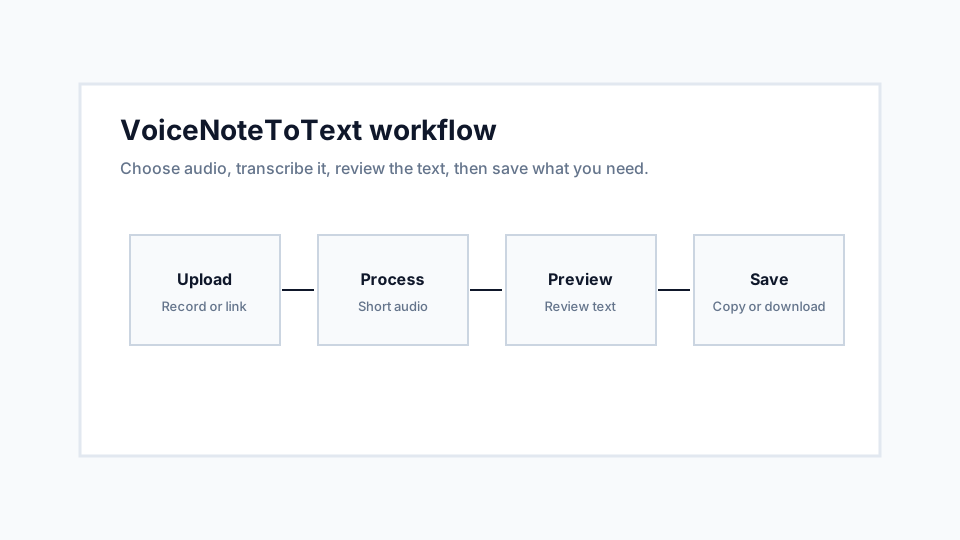
Convert an audio file to text in four steps
Open the audio-to-text converter and choose your saved file. MP3, WAV, M4A, OGG, OPUS, and WebM are supported. Check both limits before starting: up to 10 MB and up to 10 minutes per clip.
Preview the recording, choose the spoken language, and select Transcribe Audio. When the result appears, review names and numbers, then use Copy Text or Download .txt. No account is required for the free workflow; request limits apply.
For audio already online, the link extractor can prepare a public audio file and let you download it without transcription. A link to a private chat or a streaming-only player is not the same as a downloadable audio URL.
Start with the source you already have
If the audio already exists on your device, use Upload. If you need to capture speech now, use Record. If the audio is available through a public direct link or simple embedded player, use From Link.
Choosing the correct input method prevents avoidable upload failures. For example, a WhatsApp voice note saved to your phone is better handled as an upload, while a direct MP3 URL is better handled through the link tool.
Review the transcript before reusing it
The transcript is intended to give you readable text quickly, but it should still be reviewed before it is used in a sensitive document. Proper names, noisy recordings, and overlapping speakers are the most common places to check.
For everyday notes, the copy and download actions are usually enough. For research, legal, medical, or paid work, compare important lines against the original audio before relying on them.
Recommendations
- Use short clips when possible because they are easier to review and recover from if something fails.
- Select a specific language when you know it, and use auto detect only when the language is uncertain.
- Download the transcript after review if you need a local record.
Limitations
- Very noisy audio can still produce mistakes.
- Private or authenticated audio links may not be accessible to the link tool.
- Speaker labels and summaries are not guaranteed by the current core converter.